ThinkCar1.1.4
Publisher Description

**Introduction
Scan to know your vehicle and say goodbye to unknown check engine lights!
Nowadays vehicle repair and maintenance is expensive. You need a premium powerful scan tool which you can trust. Thinkcar is a professional OBD2 scan tool which provides full OBD functions and enhanced full vehicle modules health report. It also featured with premium functions like Real-Time Remote Diagnostic, vehicle Black Box (OBD data recording) and Online Community. Those unique premium features will bring your scan experience to next level.
Our Thinkcar APP is free for installation, but the Thinkcar adapter is required to purchase for the wireless communication between the vehicle and smartphone. Thinkcar adapter will read vehicle data through OBD2 port, and transfer them to Thinkcar App via Bluetooth for review. We apply same diagnostic technology from Launch Tech, which is the world leader in vehicle diagnostic industry,
**Features (ThinkCar1 or 1s is required.)
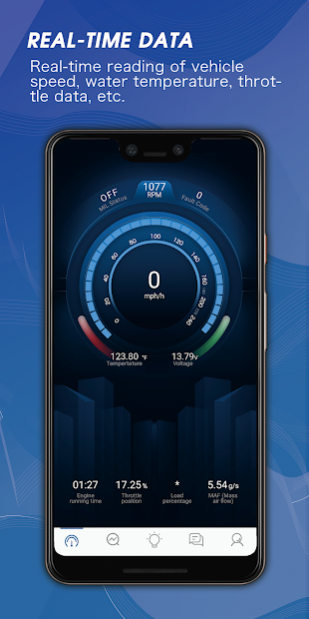
1. Real-time dashboard
Vehicle useful data will be displayed in the form of meters and graphs on the phone to show the vehicle status, which is vivid, professional and clear at a glance.
2. Powerful diagnostic and inspection functions
2-1 Full OBD2 functions (10 modes):
• Read trouble code
• Clear trouble code
• I/M Readiness / SMOG check
• Multi data stream (PIDs) graphing
• Freeze frame data
• Mode 6 (On-Board Monitoring Test Results)
• Oxygen sensor monitoring
2-2 Enhanced full vehicle systems inspection, one-key clear code:
Enhanced full vehicle inspection will scan all vehicle modules including engine, transmission, ABS, SRS, TPMS and more.
Wide coverage which nobody can match, Acura, Alfa Romeo, Audi, Bentley, BMW, Bugatti, Buick, Cadillac, Chevrolet, Chrysler, Dodge, Fiat, Ford, GMC, Honda, Hyundai, Infiniti, Jaguar, Jeep, Kia, Lamborghini, Lancia, Land Rover, Lexus, Lincoln, Maybach, Mazda, Mercedes Benz, Mercury, MINI, Mitsubishi, Nissan, Opel, Peugeot, Pontiac, Ram, Rolls Royce, Saturn, Toyota, Volkswagen, Volvo. Once scan is completed, will generate a certified vehicle health report by Thinkcar. The report contains details of all systems of the vehicle. If there is something wrong of the vehicle, the report will have a detailed fault description, so that you will know about the cause of the fault and perform needed maintenance and repair.
2-3 Real-time remote diagnostic
This is a unique feature from Thinkcar, which allows technicians to diagnose vehicles remotely and identify suspicious problems, so users are able to know about the faults and evaluate the repair expense without driving to garage. SAVE TIME, SAVE MONEY, HASSLE FREE.
2-4 Black box (OBD2 data recording)
Thinkcar can record OBD2 live data while the vehicle is running, so technicians can play back/review saved data to find the faults quickly and easily.
3. Online community:
Thinkcar App offers a social media platform for vehicle owners, DIYers, professional mechanics to share useful tips and get help from others. On our community, there are tremendous useful tips, fun pictures and videos waiting for you to discover. No purchase is needed to visit our community, just simply download/install our Thinkcar App and register an account. JOIN US TODAY!
***Contact Us
W: www.mythinkcar.com
E: service@mythinkcar.com
P: +1 833-692-2766
2151 S Haven Ave Unit 203
Ontario CA 91761 USA
About ThinkCar
The company that develops ThinkCar is THINKCAR INC. The latest version released by its developer is 1.1.4. This app was rated by 8 users of our site and has an average rating of 3.3.
To install ThinkCar on your Android device, just click the green Continue To App button above to start the installation process. The app is listed on our website since 2019-11-30 and was downloaded 1,143 times. We have already checked if the download link is safe, however for your own protection we recommend that you scan the downloaded app with your antivirus. Your antivirus may detect the ThinkCar as malware as malware if the download link to com.us.thinkcar is broken.
How to install ThinkCar on your Android device:
- Click on the Continue To App button on our website. This will redirect you to Google Play.
- Once the ThinkCar is shown in the Google Play listing of your Android device, you can start its download and installation. Tap on the Install button located below the search bar and to the right of the app icon.
- A pop-up window with the permissions required by ThinkCar will be shown. Click on Accept to continue the process.
- ThinkCar will be downloaded onto your device, displaying a progress. Once the download completes, the installation will start and you'll get a notification after the installation is finished.
Program Details
System requirements
Download information
Pricing
Version History
version 1.1.4
posted on 2019-11-30
1. Fix some UI issues in the community (ThinkMoments);
2. Fix known bugs;
3. Optimize software engineering structure, reduce the volume of APK;
4. Optimize the user experience.
version 1.1.3
posted on 2019-09-30
1. Add flashlight function.
2. Add hold pressing to delete report function.
3. Add the function of placing official content in community on the top.
4. Solve the problem that some mobile phones cannot search bluetooth, and add bluetooth automatic reconnection function.
5. Fix software download function, bluetooth firmware upgrade function, etc.
6. Modify UI display and optimize interactive operation.
7. Fix known bugs and improve stability.
8. Remove unnecessary permission requests.
version 1.1.2
posted on 2019-09-12
1. Added Bluetooth OTA upgrade function
2. Optimized apk size
3. Simplified the initialization operation when the app starts
4. Optimized start page
5. Modified some text
6. Added clickable H5 link in the system message content
7. Optimized user name display issue
8. Modified text under “Feedback”
9. Optimized permission display on Login page
version 1.1.1
posted on 2019-08-28
1- Fix known bugs
2- Optimize User Interface
version 1.0.2
posted on 2019-08-10
fix some bugs
version 1.0.1
posted on 2019-07-20
1.Fixed some bugs in the diagnostic module
2.Some processes have been optimized
version 1.0.0
posted on 2019-07-15
1. Real-time dashboard
Vehicle useful data will be displayed in the form of meters and graphs on the phone to show the vehicle status, which is vivid, professional and clear at a glance.
2. Powerful diagnostic and inspection functions
